


A Rootkit is a set of software tools frequently used by a third party (usually an intruder) after gaining access to a computer system. These tools are intended to conceal running processes, files or system data, which helps an intruder maintain access to a system without the user's knowledge. Rootkits are known to exist for a variety of operating systems such as Linux, Solaris and versions of Microsoft Windows. A computer with a rootkit on it is called a rooted computer.
Rootkits use various techniques ranging from API hooking to DKOM (Direct Kernel Object Modification) to hide their files, folders and processes. Most of the security software (like Antivirus, Antispyware etc.) aren't designed to handle these type of threats. Hence they don't "see" the rooted files. Rootkit detection and removal needs some specialized tools. Let's see how we can detect, remove and prevent Rootkits in subsequent sections.
Rootkit detection:
Since most of the Rootkits hide themselves using API hooking, the first step would be, to check whether there are any API hooks. There are quite a few tools which do this job. One of the easiest tools to check for API hooks is APIHookCheck. This is a command line tool, just type:
APIHookCheck > result.html
at Command Prompt from the directory where the executable is present. It generates a HTML file with the results. Here's a screenshot of result generated by APIHookCheck in system with HackerDefender in it:
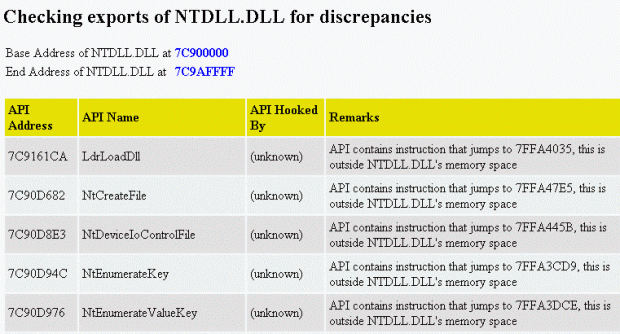
As you can see from the aboce screenshot, the export addresses of APIs in the NTdll.dll are pointing to some other module which is outside the Ntdll.dll's address space. This could indicate a Rootkit activity.
VICE, IATHookAnalyzer and Rootkit Hook Analyzer are similar tools, which scan for API hooks. (Unfortunately, Rootkit Hook Analyzer and IATHookAnalyzer missed the HackerDefender!)
Another interesting tool is DeviceTree. It lists all the drivers present in the system. DeviceTree is not technically a Rootkit detector, but can be used as one, because most of the Rootkits will have a driver to operate in kernel mode. Since this driver is hidden, this can not be located by a search. DeviceTree is so powerful that even Rootkit drivers are listed by it! Here's a screenshot showing DeviceTree detecting HackerDefender Rootkit:

Rootkit removal:
Above mentioned tools are quick ways to check for Rootkits, and if any hooks are found, then the next task is to search all the Rootkit related processes, services (drivers) and files to remove them. Following are some of the tools which can be used:
Rootkit Revealer is one of the popular Rootkit scanners. I don’t need to say anything about it ;-). But it doesn't provide any method to remove the detected files. The detected files can be deleted using the "Delete on reboot" option in KillBox ("Standard file kill" will NOT work). Here's a screenshot showing Rootkit Revealer scan results:

As of now, IceSword is treated as one of the most advanced Rootkit detection and removal tool, and moreover it's free! It provides the facility to kill/stop the hidden Rootkit processes and services. Once these processes are stopped, the Rootkit files become visible and they can be deleted in conventional way. Here's a screenshot showing the IceSword in action:

F-Secure BlackLight and Greatis UnHackMe are some of the tools which can detect and remove Rootkits. UnHackMe is a commercial software and BlackLight will become one from march, 2006. Latest versions of Webroot SpySweeper and PC Tools Spyware Doctor are also able to handle Rootkits!
Rootkit prevention:
Most of the Rootkits use drivers to work in kernel mode. In Windows NT based systems, the drivers can be loaded/unloaded using techniques similar to the creation/termination of a service. Most of the Rootkits use these techniques to load their driver into memory. In Windows NT based systems, only users with Admin rights are allowed to install program which have drivers or which create services. The same rule holds for a Rootkit too, if the user doesn't have Admin rights, then it can't start and hence it can't hide itself! So, the first step in prevention of Rootkit is to run in less privileged user mode.
Another simple method is make use of the sc command in Windows XP. Just run the command sc lock at Command Prompt. This locks up the Windows Service database. Due to this, new services can not be created or initiated! This prevents the Rootkit from installing! The disadvantage (if it can be called as one) is that the Command Prompt window in which the sc is executed, should no be closed. If it's closed, then the service lock is released.
Another approach is to use HIPS (Host based Intrusion Prevention System) tool like AntiHook. This tool actively monitors the system and alerts the user if some programs attempts to hook APIs.
And lastly, there's one interesting tool called Sandboxie, as the name says it creates a sand box like environment within which we can run any program. Most of the malware which use Rootkit technology come to the system through the exploits in the web browser.If the browsers are sandboxed, then there is no way a malware can enter into the system, as Sandboxie intercepts all the data flow from the browser and stores in its transient storage area. Both AntiHook and Sandboxie are available for free, so give them a try!


0 comments:
Post a Comment