Swatkat's rants

  • Subscribe to our RSS feed.
  • Twitter
  • StumbleUpon
  • Reddit
  • Facebook
  • Digg

Tuesday, 12 September 2006

Gromozon Rootkit

Posted on 19:12 by Unknown
Gromozon is a new rootkit in the block. It installs a spyware called LinkOptimizer, giving the rootkit power to the spyware. Gromozon is a user mode rootkit and uses the AppInit_DLLs Registry key to load its DLL into memory. Moreover it hides this Registry key and hence it can not be viewed by "normal" tools like Regedit or HijackThis. Along with this, it also uses a host of other techniques like - randomly named DLLs, using Windows reserved names, hiding as ADS in NTFS systems etc. The DLL registered in the AppInit_DLLs key is responsible for the rootkit like behavior of Gromozon. It hooks some APIs in Kernel32.dll, Advapi32.dll, Psapi.dll and Ntdll.dll, to hide its files.

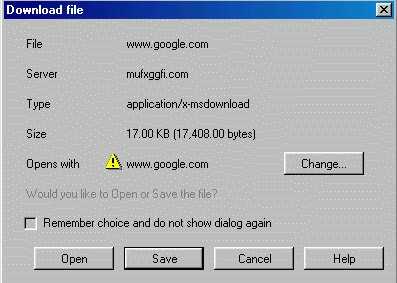
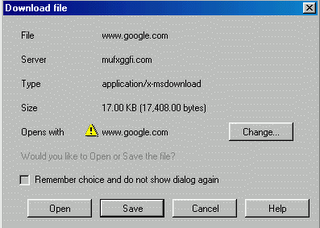
Gromozon tries to drops its file through a JavaScript. Most of the times, it drops a file named www.google.com. Note that, the file is not a HTML web-link, instead it’s an executable file with .COM extension! When this file downloaded, it downloads more malware components and installs into the PC. Here's a screenshot showing the Gromozon trying to drop its installer.


Prevx has released a removal tool which successfully detects and removes the Gromozon rootkit. You can download it here.

More information regarding the Gromozon can be obtained at CastleCops Wiki and in this excellent PDF document by Prevx researcher Marco Guiliani.
Read More
Posted in | No comments

Monday, 28 August 2006

Removing Mailbot.AZ (aka Rustok.A) Rootkit

Posted on 10:22 by Unknown
Mailbot.AZ (also known as PE386 or Rustock.A) is a kernel mode rootkit backdoor virus. It contains only one file-its driver-and it is stored as a hidden Alternate Data Stream (ADS) of System32 folder in NTFS systems. ADS itself isn't scanned by most of the security software and moreover the Mailbot.AZ driver ADS is hidden using kernel mode rootkit techniques. This makes the detection more difficult. More information about the Mailbot.AZ can be obtained at F-Secure Rootkit Information Pages or Symantec Security Weblog.


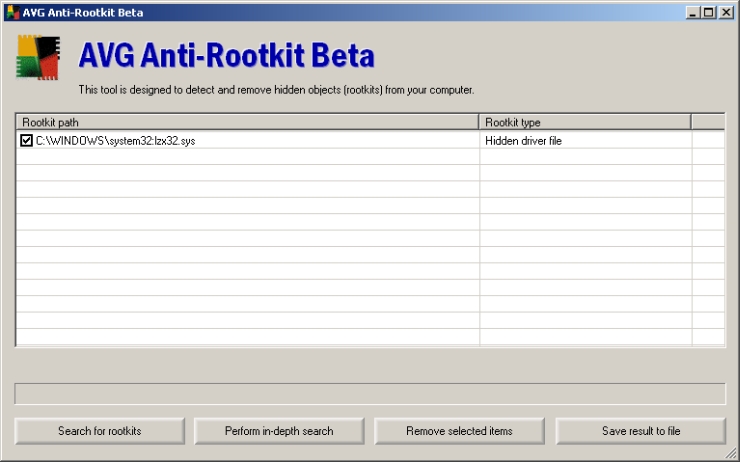
The new AVG Anti-Rootkit Beta detects and removes the Mailbot.AZ rootkit. Lets see how we can do it. Download and install the AVG Anti-Rootkit Beta.


Run the AVG Anti-Rootkit Beta, and click "Perform in-depth search". Allow AVG to complete the scan. It will display the hidden Mailbot.AZ rootkit driver. This is shown in the below screenshot.


Select the rootkit driver by placing a checkmark against it and click "Remove selected items". Next, agree for the terms and conditions that is displayed by AVG and click "OK" to reboot the PC. An example is shown in the below screenshot.


AVG Anti-Rootkit Beta renames the Mailbot.AZ rootkit driver so that the driver will not be loaded at the next reboot. But, it doesn't remove the actual rootkit ADS and its Registry entries. These can be removed by using ADS Spy (or HijackThis) and RegEdit respectively.


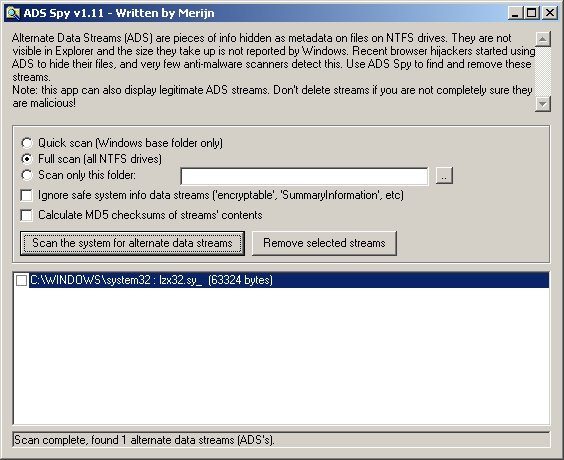
Download ADS Spy, a freeware which can be used to detect and remove ADS in NTFS systems. Run ADS Spy, select the "Full scan (all NTFS drives)" and click "Scan the system for alternate data streams". Once the scan is complete, select the rootkit driver ADS from the scan result, and click "Remove selected streams". An example is shown in the below screenshot.

(Note that the driver is renamed to lzx32.sy_)


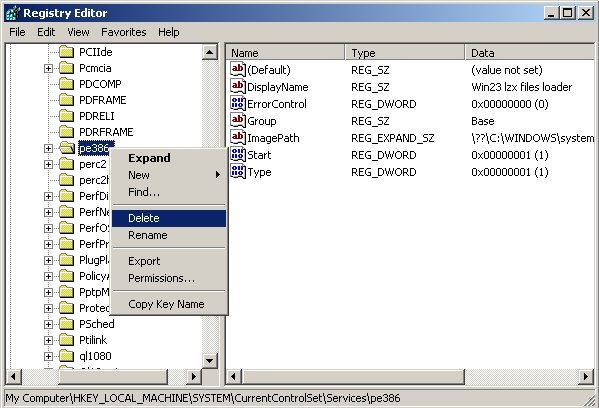
Next, go to Start Menu > Run, and type Regedit and press Enter key. Here, navigate to the key HKEY_LOCAL_MACHINE\SYSTEM\CurrentControlSet\Services\pe386 (or HKEY_LOCAL_MACHINE\SYSTEM\CurrentControlSet\Services\msguard). Right-click on this key (i.e. on pe386 or msguard) and select "Delete". Exit from Registry Editor. This is shown in the below screenshot.
Read More
Posted in | No comments

Tuesday, 8 August 2006

BitDefender RootkitUncover

Posted on 07:49 by Unknown
Softwin has released a rootkit removal tool, called BitDefender RootkitUncover. Its still in beta stage, but it looks very promising. RootkitUncover is very easy to use, and interface is similar to that of F-Secure’s BlackLight. Its very heartening to see that more and more Antivirus firms are considering rootkit threats seriously. Download it here or here.
Read More
Posted in | No comments

Tuesday, 30 May 2006

Catching hook based keyloggers using IceSword

Posted on 11:21 by Unknown
Message passing is a technique used in operating system for inter-process communications. In Windows, there are some standard messages and these are named WM_XXXX, where WM stands for Windows Message and XXXX is the actual name of the message. A complete list of messages and their description can be found in this page.

Message hooking is a technique in which a message is monitored (popularly called as hooked) by a program. Because of this hook, the hooking program gets a notification whenever that message is passed. Windows provides some APIs (functions) to hook messages, such as SetWindowsHookEx. Using this API, a message hook can be installed. Similar to the messages, Windows also provides various message hooks. These message hooks are named WH_XXXX. For example, a keyboard message has the name WM_KEYBOARD and the keyboard hook has the name WH_KEYBOARD.

Now a bit about keyloggers! There are two types of software keyloggers, namely DLL based keyloggers and driver based keyloggers. DLL based keyloggers, also called as hook based keyloggers, use the keyboard message hook to intercept the communication and capture key presses. They are named DLL based keyloggers because they use a DLL to to do implement logging functions. Driver based keyloggers are also called as Kernel level keyloggers. They use a device driver to directly monitor the keyboard, at kernel level, for key presses. Most of these keyloggers will not have any additional DLLs or executables. Only a driver is enough to do the job!

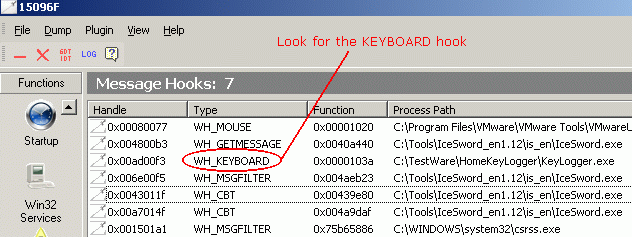
We can use IceSword to capture DLL based keyloggers easily. IceSword has a section named "Message Hooks" where it displays all the message hooks in the system along with the hooking program. There can be some hooks used by legitimate processes (for example, firewall, antivirus and even IceSword). But as we have seen earlier, keyloggers use the WH_KEYBOARD hook to hook the WM_KEYBOARD messages.

So, in this section of IceSword, just look for the WH_KEYBOARD hook. If this hook is present, note the process associated with it. In this example, we can see a process named Keylogger.exe is using WH_KEYBOARD. In this case, the process name is pretty straight forward. If you are not sure what really the hooking process is, just use Google to find information about the file. If there are no reliable information about that particular file, then upload and scan the file at any of the online file scanner sites (like VirusTotal or Jotti's Malware Scan). If the file is found to be "bad", then it should be removed immediately. IceSword's "Process" section can be used to locate and terminate the keylogger process. Once the process is killed, just navigate to the file location in Windows Explorer and delete the files.

The advantage of using IceSword to catch the keyloggers is that, it can show even "rooted" keyloggers, i.e. IceSword can detect message hooks even if, say, keylogger uses rootkit technology to hide. There may be additional files, related to the keylogger, in the system. Hence it is advised to update all the security software and do a full system-scan.

Since driver based keyloggers don't use Message hooks, they are not displayed in the "Message Hooks" section of IceSword. As we have seen earlier, these types of keyloggers use a device driver. Actually, this driver can also be detected using the "Kernel Modules" section of IceSword. But, in a system there will be large number of drivers, and it may become very tedious to go through the driver list shown by IceSword.

Download IceSword 1.18 English Version from here
Read More
Posted in | No comments

Monday, 20 February 2006

Detecting Rootkits using "normal" tools

Posted on 10:39 by Unknown
Most of the Rootkits hide their processes, files and folders using API hooking techniques. Normal system tools like Windows Task Manager, Windows Explorer etc. use some Windows APIs to get the list of running processes or to show the files and folders in the system, respectively. Rootkits hook these APIs and manipulate the results so as to hide themselves. As a result, Windows Task Manager, Windows Explorer and similar tools don't "see" the rooted files.

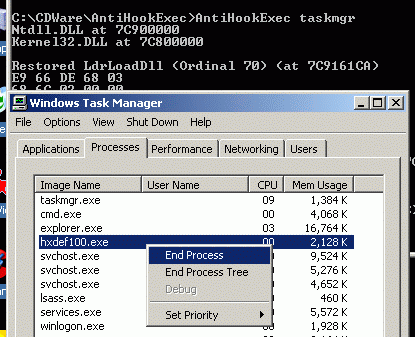
But, there's an ingenious tool called AntiHookExec, which runs a specified program with all the hooks removed. AntiHookExec tries to find out the API hooks present in the system and if it finds any, then it "restores" the original APIs. So, the program which is started from AntiHookExec will not be affected by the API hooks of the Rootkit. AntiHookExec is an easy to use command line tool. The syntax is as shown below:

AntiHookExec ProgramName

where ProgramName is the name of the program (with its path) which needs to be started through AntiHookExec.

For example, to start Windows Task Manager through AnitHookExec, the command would be:

AntiHookExec Taskmgr.exe

Similarly, to start HijackThis through AntiHookExec, the command would be:

AntiHookExec C:\HJT\HijackThis.exe

assuming that HijackThis.exe is present in the folder C:\HJT\.

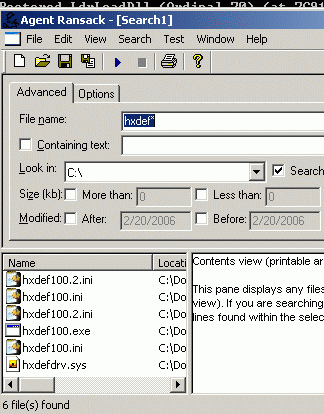
Below screenshots show the HackerDefender Rootkit's process and files visible in Windows Task Manager and Agent Ransack, a search tool, both of which started through AntiHookExec.

Read More
Posted in | No comments

Thursday, 16 February 2006

Rootkit detection, removal and prevention!

Posted on 12:21 by Unknown
Here's a Wiki definition for Rootkit:
A Rootkit is a set of software tools frequently used by a third party (usually an intruder) after gaining access to a computer system. These tools are intended to conceal running processes, files or system data, which helps an intruder maintain access to a system without the user's knowledge. Rootkits are known to exist for a variety of operating systems such as Linux, Solaris and versions of Microsoft Windows. A computer with a rootkit on it is called a rooted computer.

Rootkits use various techniques ranging from API hooking to DKOM (Direct Kernel Object Modification) to hide their files, folders and processes. Most of the security software (like Antivirus, Antispyware etc.) aren't designed to handle these type of threats. Hence they don't "see" the rooted files. Rootkit detection and removal needs some specialized tools. Let's see how we can detect, remove and prevent Rootkits in subsequent sections.


Rootkit detection:
Since most of the Rootkits hide themselves using API hooking, the first step would be, to check whether there are any API hooks. There are quite a few tools which do this job. One of the easiest tools to check for API hooks is APIHookCheck. This is a command line tool, just type:

APIHookCheck > result.html

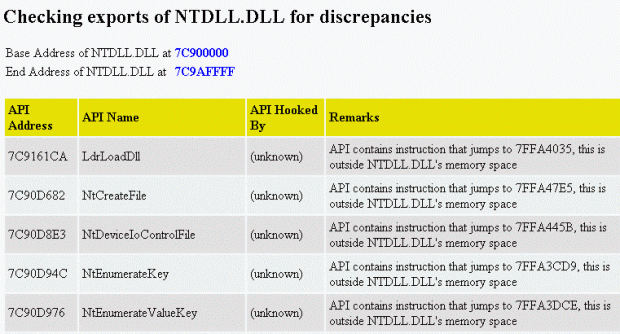
at Command Prompt from the directory where the executable is present. It generates a HTML file with the results. Here's a screenshot of result generated by APIHookCheck in system with HackerDefender in it:

As you can see from the aboce screenshot, the export addresses of APIs in the NTdll.dll are pointing to some other module which is outside the Ntdll.dll's address space. This could indicate a Rootkit activity.
VICE, IATHookAnalyzer and Rootkit Hook Analyzer are similar tools, which scan for API hooks. (Unfortunately, Rootkit Hook Analyzer and IATHookAnalyzer missed the HackerDefender!)

Another interesting tool is DeviceTree. It lists all the drivers present in the system. DeviceTree is not technically a Rootkit detector, but can be used as one, because most of the Rootkits will have a driver to operate in kernel mode. Since this driver is hidden, this can not be located by a search. DeviceTree is so powerful that even Rootkit drivers are listed by it! Here's a screenshot showing DeviceTree detecting HackerDefender Rootkit:


Rootkit removal:
Above mentioned tools are quick ways to check for Rootkits, and if any hooks are found, then the next task is to search all the Rootkit related processes, services (drivers) and files to remove them. Following are some of the tools which can be used:
Rootkit Revealer is one of the popular Rootkit scanners. I don’t need to say anything about it ;-). But it doesn't provide any method to remove the detected files. The detected files can be deleted using the "Delete on reboot" option in KillBox ("Standard file kill" will NOT work). Here's a screenshot showing Rootkit Revealer scan results:

As of now, IceSword is treated as one of the most advanced Rootkit detection and removal tool, and moreover it's free! It provides the facility to kill/stop the hidden Rootkit processes and services. Once these processes are stopped, the Rootkit files become visible and they can be deleted in conventional way. Here's a screenshot showing the IceSword in action:

F-Secure BlackLight and Greatis UnHackMe are some of the tools which can detect and remove Rootkits. UnHackMe is a commercial software and BlackLight will become one from march, 2006. Latest versions of Webroot SpySweeper and PC Tools Spyware Doctor are also able to handle Rootkits!


Rootkit prevention:
Most of the Rootkits use drivers to work in kernel mode. In Windows NT based systems, the drivers can be loaded/unloaded using techniques similar to the creation/termination of a service. Most of the Rootkits use these techniques to load their driver into memory. In Windows NT based systems, only users with Admin rights are allowed to install program which have drivers or which create services. The same rule holds for a Rootkit too, if the user doesn't have Admin rights, then it can't start and hence it can't hide itself! So, the first step in prevention of Rootkit is to run in less privileged user mode.

Another simple method is make use of the sc command in Windows XP. Just run the command sc lock at Command Prompt. This locks up the Windows Service database. Due to this, new services can not be created or initiated! This prevents the Rootkit from installing! The disadvantage (if it can be called as one) is that the Command Prompt window in which the sc is executed, should no be closed. If it's closed, then the service lock is released.

Another approach is to use HIPS (Host based Intrusion Prevention System) tool like AntiHook. This tool actively monitors the system and alerts the user if some programs attempts to hook APIs.

And lastly, there's one interesting tool called Sandboxie, as the name says it creates a sand box like environment within which we can run any program. Most of the malware which use Rootkit technology come to the system through the exploits in the web browser.If the browsers are sandboxed, then there is no way a malware can enter into the system, as Sandboxie intercepts all the data flow from the browser and stores in its transient storage area. Both AntiHook and Sandboxie are available for free, so give them a try!
Read More
Posted in | No comments
Newer Posts Older Posts Home
Subscribe to: Posts (Atom)

Popular Posts

  • Ax Video Plugin
    Ax Video Plugin is one of the latest fake codec/plugin in the block. The site http://axvideodownload.com/ uses the same old fake "Vide...
  • Spyware Guard 2008
    Spyware Guard 2008 is a new rogue application. Does that name sound familiar? Well, yes, there is a legitimate application named SpywareGuar...
  • Javacool EULAlyzer!
    Have you ever read those ultra-long EULA (End User License Agreement) pages while you are installing any software? I think no one will read ...
  • Zlob brings back fake MP3s!
    Last August, I had blogged about Zlob gang using fake MP3 download sites to push their malware (link here ). Afterwards, we started to see m...
  • Myphonegames.co.uk hacked?!
    It seems that some pages of a mobile-phone games website www.myphonegames.co.uk have been hacked to execute malicious looking Javascript. A...
  • twitcurl - C++ twitter API library
    twitcurl is an open-source pure C++ library for twitter REST APIs. Currently, it has support for most of the twitter APIs and it will be upd...
  • DomPlayer - Rogue Multimedia Player
    DomPlayer is a new rogue multimedia player on the loose. The gang behind DomPlayer is making use of fake video files (available as torrents)...
  • Some new malware - a.exe, gop.exe etc
    We have some "new" malware this time, ranging from trojans to rootkits. One of them is a trojan which detected by some of the AVs ...
  • ThinkPoint rogue antivirus
    ThinkPoint is a new addition to the long list of rogue antivirus programs. ThinkPoint uses fake codec download tricks for its distribution. ...
  • Removing Mailbot.AZ (aka Rustok.A) Rootkit
    Mailbot.AZ (also known as PE386 or Rustock.A) is a kernel mode rootkit backdoor virus. It contains only one file-its driver-and it is stored...

Categories

  • a.exe
  • Autohotkey
  • C++
  • fake mp3 downloads
  • gop.exe
  • NewMediaCodec
  • OAuth
  • Orkut hating virus
  • Privacy Protector
  • rootkit
  • SysProt AntiRootkit
  • TDSServ rootkit removal
  • twitCurl
  • twitter
  • Udefender
  • Ultimate Cleaner
  • vdo_
  • Zlob
  • Zlob rootkit

Blog Archive

  • ►  2013 (1)
    • ►  June (1)
  • ►  2010 (6)
    • ►  October (2)
    • ►  September (2)
    • ►  July (1)
    • ►  April (1)
  • ►  2009 (12)
    • ►  September (1)
    • ►  May (1)
    • ►  April (1)
    • ►  March (4)
    • ►  January (5)
  • ►  2008 (44)
    • ►  December (6)
    • ►  November (6)
    • ►  October (4)
    • ►  September (15)
    • ►  August (2)
    • ►  June (2)
    • ►  May (1)
    • ►  April (1)
    • ►  March (6)
    • ►  January (1)
  • ►  2007 (38)
    • ►  December (1)
    • ►  November (2)
    • ►  October (9)
    • ►  September (2)
    • ►  August (8)
    • ►  July (11)
    • ►  June (3)
    • ►  March (2)
  • ▼  2006 (6)
    • ▼  September (1)
      • Gromozon Rootkit
    • ►  August (2)
      • Removing Mailbot.AZ (aka Rustok.A) Rootkit
      • BitDefender RootkitUncover
    • ►  May (1)
      • Catching hook based keyloggers using IceSword
    • ►  February (2)
      • Detecting Rootkits using "normal" tools
      • Rootkit detection, removal and prevention!
  • ►  2005 (30)
    • ►  December (2)
    • ►  November (2)
    • ►  October (4)
    • ►  September (5)
    • ►  August (11)
    • ►  July (6)
Powered by Blogger.

About Me

Unknown
View my complete profile